Brand Profile Setup
Your brand profile tells the AI about your business, tone of voice, and unique selling points. The more context you provide, the better your generated headlines and descriptions will be.
Why Brand Profile Matters
Section titled “Why Brand Profile Matters”Without a brand profile, the AI can only work with:
- The keyword text
- Your landing page content
With a brand profile, the AI also knows:
- Your brand name and how to use it
- Your tone of voice (professional, friendly, urgent)
- Your unique selling points
- Who your target audience is
- Which competitor names to avoid
Setting Up Your Profile
Section titled “Setting Up Your Profile”Go to Settings → Account Context to configure your brand profile.
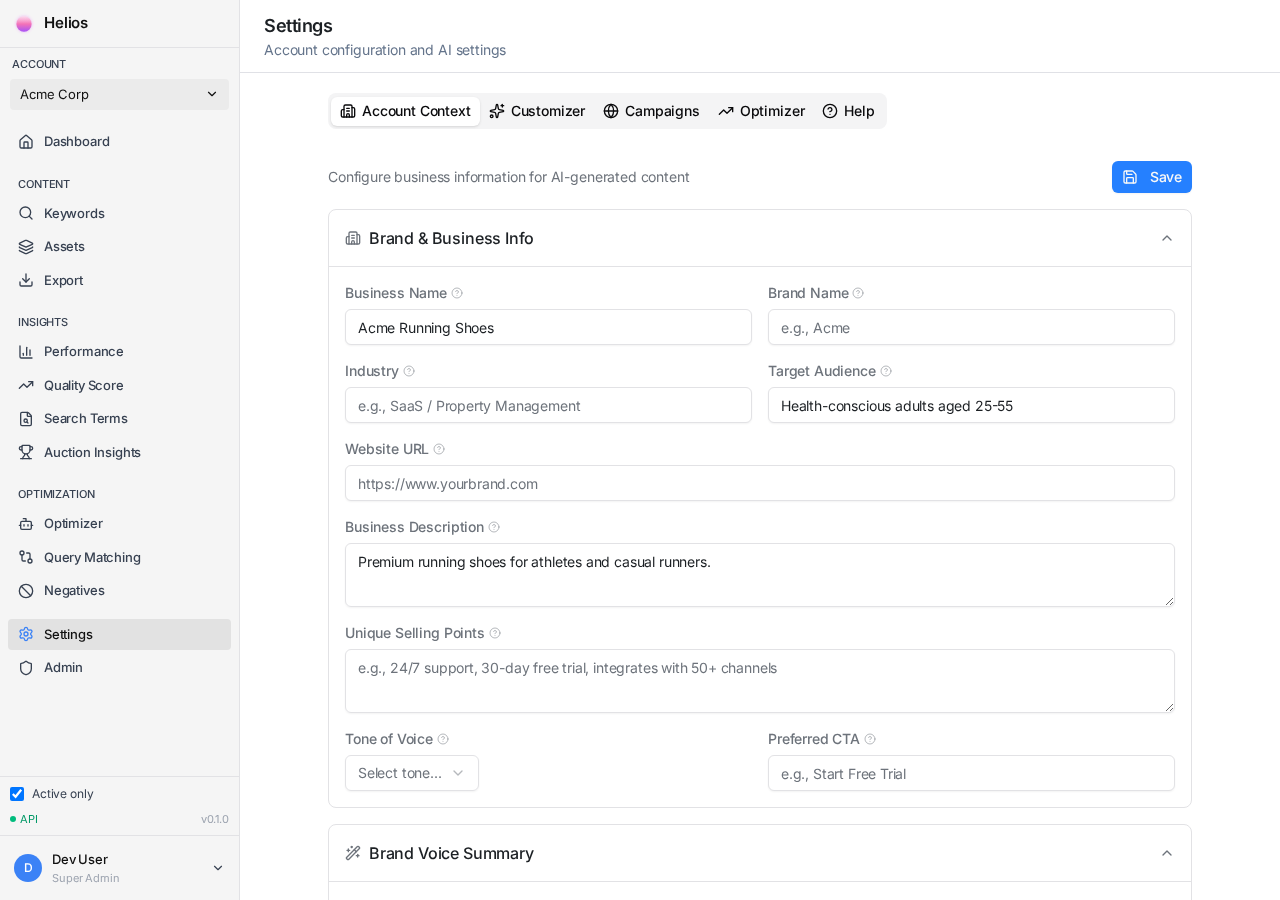
- Enter your Brand Name exactly as it should appear in ads
- Write a Business Description (2-3 sentences about what you do)
- Select your Industry from the dropdown
- Choose your Tone of Voice
- Define your Target Audience
- Add your Unique Selling Points (USPs)
- List any Competitor Names to avoid in copy
Profile Fields Explained
Section titled “Profile Fields Explained”Brand Name
Section titled “Brand Name”How your brand name should appear in headlines. Examples:
- “CloudBooks” (not “Cloudbooks” or “Cloud Books”)
- “Acme Corp” (not “ACME” or “Acme Corporation”)
Business Description
Section titled “Business Description”A concise explanation of what your business does. This helps the AI understand your value proposition.
“CloudBooks is accounting software designed for UK small businesses. We automate invoicing, expenses, and MTD submissions with award-winning customer support.”
“We sell software to businesses.”
Tone of Voice
Section titled “Tone of Voice”Choose the tone that matches your brand:
| Tone | Best For | Example |
|---|---|---|
| Professional | B2B, Enterprise | ”Streamline your operations” |
| Friendly | B2C, Consumer | ”Make life easier” |
| Urgent | Sales, Limited offers | ”Don’t miss out” |
| Authoritative | Expert services | ”The industry standard” |
Target Audience
Section titled “Target Audience”Who are you trying to reach? Be specific about:
- Job titles (e.g., “HR Directors”, “Small business owners”)
- Company size (e.g., “SMEs with 10-50 employees”)
- Location (e.g., “UK-based businesses”)
Unique Selling Points (USPs)
Section titled “Unique Selling Points (USPs)”List 3-5 things that differentiate you from competitors:
- “Free 30-day trial”
- “Award-winning UK support team”
- “Integrates with 100+ apps”
- “MTD compliant”
Competitor Names
Section titled “Competitor Names”List competitor brand names that should never appear in your ad copy. This prevents the AI from accidentally mentioning them.
Campaign-Level Overrides
Section titled “Campaign-Level Overrides”You can set different brand context for specific campaigns. This is useful when:
- Running campaigns in different languages
- Promoting different products or services
- Using different tones for different audiences
Go to Settings → Campaign Contexts to configure overrides.
Next Step
Section titled “Next Step”With your brand profile set up, you’re ready to generate content for your keywords.